[App] Multiple Codex (ChatGPT) accounts on one machine

![[App] Multiple Codex (ChatGPT) accounts on one machine](/content/images/size/w2000/2026/07/codex-app-dual-thumb.png)
Fast track: throw this post's URL at your AI and tell it to set this up for you. (The app version is trickier because of signing, so double-check the result.)
TLDR:
- Run two (or more) ChatGPT desktop apps, one per account. At the same time.
- Updates follow automatically, when you open the app.
- Caveat: passkey login won't work. Log in with OTP, password, or SSO.
How
Save this as ~/.local/bin/chatgpt2-rebuild. (You need the original ChatGPT.app installed, and clang to compile the stub → xcode-select --install.) The launcher synchronizes the sidebar state in both directions. It copies ChatGPT's state to ChatGPT2 before launch, then copies ChatGPT2's final state back to ChatGPT after ChatGPT2 exits.
#!/usr/bin/env bash
set -euo pipefail

SRC="/Applications/ChatGPT.app"
DST="/Applications/ChatGPT2.app"
NEW_ID="com.openai.codex2"
NEW_NAME="ChatGPT2"
CODEX_HOME2="$HOME/.codex2"
USERDATA2="$HOME/Library/Application Support/Codex2"
P=/usr/libexec/PlistBuddy

[ -d "$SRC" ] || { echo "ERROR: $SRC not found"; exit 1; }
command -v clang >/dev/null || { echo "ERROR: clang needed (xcode-select --install)"; exit 1; }

# don't clobber a running instance
if pgrep -f "ChatGPT2.app/Contents/MacOS/ChatGPT.bin" >/dev/null; then
  echo "ChatGPT2 is running — quit it first, then re-run."; exit 1
fi

EXE="$($P -c "Print :CFBundleExecutable" "$SRC/Contents/Info.plist")"

echo "[1/5] APFS clone of $SRC → $DST …"
rm -rf "$DST"
cp -Rc "$SRC" "$DST"                      # clonefile: copy-on-write, ~0 extra disk

echo "[2/5] patch Info.plist…"
PL="$DST/Contents/Info.plist"
$P -c "Set :CFBundleIdentifier $NEW_ID" "$PL"
$P -c "Set :CFBundleName $NEW_NAME" "$PL" 2>/dev/null || $P -c "Add :CFBundleName string $NEW_NAME" "$PL"
$P -c "Set :CFBundleDisplayName $NEW_NAME" "$PL" 2>/dev/null || $P -c "Add :CFBundleDisplayName string $NEW_NAME" "$PL"
$P -c "Add :LSEnvironment:CODEX_HOME string $CODEX_HOME2" "$PL" 2>/dev/null || $P -c "Set :LSEnvironment:CODEX_HOME $CODEX_HOME2" "$PL"
$P -c "Add :SUEnableAutomaticChecks bool false" "$PL" 2>/dev/null || $P -c "Set :SUEnableAutomaticChecks false" "$PL"

echo "[3/5] install lazy launcher (update-on-use script + tiny Mach-O stub; main exe → *.bin)…"
mv "$DST/Contents/MacOS/$EXE" "$DST/Contents/MacOS/$EXE.bin"

# (a) launch script — on every open: compare versions, re-clone + reopen if they differ
cat > "$DST/Contents/Resources/cg2-launch.sh" <<'LAUNCH'
#!/bin/bash
set -u
SDIR="$(cd "$(dirname "${BASH_SOURCE[0]}")" && pwd)"   # …/ChatGPT2.app/Contents/Resources
APP="$(cd "$SDIR/../.." && pwd)"                        # …/ChatGPT2.app
BIN="$SDIR/../MacOS/ChatGPT.bin"
SRC="/Applications/ChatGPT.app"
P=/usr/libexec/PlistBuddy
ver(){ "$P" -c "Print :CFBundleShortVersionString" "$1/Contents/Info.plist" 2>/dev/null; }
cur="$(ver "$SRC")"; mine="$(ver "$APP")"
if [ -n "$cur" ] && [ -n "$mine" ] && [ "$cur" != "$mine" ]; then
  # original updated → re-clone in a detached helper, then reopen (this launch is handed off)
  /usr/bin/nohup /bin/bash -c '
    "$HOME/.local/bin/chatgpt2-rebuild" >/tmp/chatgpt2-autoupdate.log 2>&1 \
      && /usr/bin/env -u CODEX_HOME -u ORCA_CODEX_HOME open -a /Applications/ChatGPT2.app
  ' >/dev/null 2>&1 &
  exit 0
fi
# up-to-date → normal launch of account-2 instance
export CODEX_HOME="$HOME/.codex2"

PRIMARY_STATE="$HOME/.codex/.codex-global-state.json"
SECONDARY_STATE="$HOME/.codex2/.codex-global-state.json"

sync_state() {
  local from="$1"
  local to="$2"
  local tmp="${to}.sync.$$"

  [ -f "$from" ] || return 0

  if /bin/cp -p "$from" "$tmp"; then
    /bin/mv -f "$tmp" "$to"
  else
    /bin/rm -f "$tmp"
    return 1
  fi
}

# Keep the sidebar up to date: ChatGPT → ChatGPT2 before launch.
sync_state "$PRIMARY_STATE" "$SECONDARY_STATE" || \
  echo "WARNING: could not import ChatGPT sidebar state" >&2

# Keep the sidebar up to date: ChatGPT2 → ChatGPT after normal exit.
trap 'sync_state "$SECONDARY_STATE" "$PRIMARY_STATE" || true' EXIT

"$BIN" "--user-data-dir=$HOME/Library/Application Support/Codex2" "$@"
status=$?
exit "$status"
LAUNCH
chmod +x "$DST/Contents/Resources/cg2-launch.sh"

# (b) Mach-O stub — launchd won't run a script as a bundle's main executable (POSIX 162),
#     so this tiny stub just hands off to the script above.
SRC_C="$(mktemp /tmp/cg2launcher.XXXX.c)"
cat > "$SRC_C" <<EOF
#include <stdio.h>
#include <stdlib.h>
#include <string.h>
#include <limits.h>
#include <libgen.h>
#include <unistd.h>
#include <mach-o/dyld.h>
int main(int argc, char **argv){
    char exe[PATH_MAX]; uint32_t sz=sizeof(exe);
    if(_NSGetExecutablePath(exe,&sz)!=0) return 71;
    char dir[PATH_MAX]; strncpy(dir,dirname(exe),sizeof(dir));
    char sh[PATH_MAX];
    snprintf(sh,sizeof(sh),"%s/../Resources/cg2-launch.sh",dir);
    char **n=calloc(argc+3,sizeof(char*)); int k=0;
    n[k++]="/bin/bash"; n[k++]=sh;
    for(int i=1;i<argc;i++) n[k++]=argv[i];
    n[k]=NULL;
    execv("/bin/bash",n); perror("execv"); return 72;
}
EOF
clang -O2 -arch arm64 -o "$DST/Contents/MacOS/$EXE" "$SRC_C"; rm -f "$SRC_C"

echo "[4/5] sign — DEEP ad-hoc reseal of the whole clone…"
codesign --force --deep --sign - "$DST"

echo "[5/5] clear quarantine + register…"
xattr -dr com.apple.quarantine "$DST" 2>/dev/null || true
mkdir -p "$USERDATA2"
/System/Library/Frameworks/CoreServices.framework/Frameworks/LaunchServices.framework/Support/lsregister -f "$DST"

echo "Done (APFS clone)."
This assumes that the two apps are used one at a time. A normal quit is required for the final ChatGPT2 → ChatGPT sync. A force-quit, crash, or sudden shutdown may skip that final copy.
Then run it:
pkill -f "ChatGPT2.app" 2>/dev/null   # quit it if running
chatgpt2-rebuild                       # ~7s, creates /Applications/ChatGPT2.app
env -u CODEX_HOME -u ORCA_CODEX_HOME open -a /Applications/ChatGPT2.app
On first launch, log in to account 2. (Use OTP/password/SSO, not passkey — see the caveat below.)
Note: if you `open` from a shell that exports `CODEX_HOME` (e.g. Orca), that value leaks into the app and crosses up your accounts. Open with `env -u` as shown above.
Why it works
The app's "identity" is its bundle id + signature. After cloning, we change the id to com.openai.codex2, and the launcher injects CODEX_HOME=~/.codex2 + --user-data-dir=…/Codex2. That splits the account (auth.json), the web login, and the Electron single-instance lock, so both run at the same time. (--user-data-dir is the key: Electron's lock is keyed by the user-data-dir, not the bundle id, so changing the id alone won't let two run.)
Why clone, not symlink? If you symlink the frameworks/binary back to the original, the Chromium helper (Codex (Service)) crashes the instant it starts, because its sandbox / framework path resolution needs the real bundle path and a symlink throws it off. The main process then retries the helper forever, pinned at 100% CPU. So "symlink to auto-follow updates" is impossible.
Why --deep re-sign? The inner frameworks/helpers carry OpenAI's team signature (hardened runtime). If only the top bundle is ad-hoc, the team mismatch makes AMFI reject the launch outright (-420). So the whole clone must be re-signed ad-hoc to unify the identity, and then the helper starts. Since the clone is an independent copy, --deep never touches the original. (Conversely, never --deep-sign while the frameworks are symlinks — it would re-sign the original through the links.)
Updates: automatic, on open
The clone is a snapshot from copy time, so it doesn't auto-update on its own. Instead, when you open the app, the launcher compares its version to the original and, if they differ, re-clones automatically (~7s) and relaunches. The original updates as usual via Sparkle, and ChatGPT2 rides on top when you open it. No background daemon, no polling. (Letting ChatGPT2 self-update via Sparkle would be rejected for a signature mismatch, or would wipe the customization, so its self-update is disabled.)
If you run the updater in ChatGPT2, the update fails with a signature mismatch, as shown in the screenshot below.
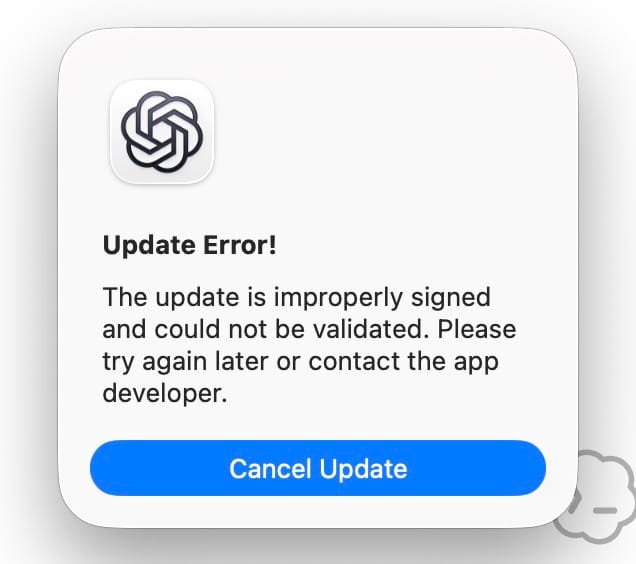
When the original app is updated, ChatGPT2 is updated automatically as well, so there is no need to try to update the copied app.
Caveat: passkey doesn't work
The moment you re-sign, the app loses its Team ID and keychain access. Passkeys live in the iCloud Keychain / Secure Enclave, and access is gated by exactly that, so in ChatGPT2 the "Verify your identity → passkey" screen spins forever. It can't be fixed (that would need OpenAI's real signing certificate, which we don't have). Use "Try another method" with OTP, password, or Google/Apple/MS SSO instead. The session is stored as a cookie, so it persists across restarts.
Part 1 (CLI) is here: Multiple Codex (ChatGPT) accounts on one machine