> ## Content Index
> Fetch the complete content index at: https://sanghunkang.com/llms.txt
> Use this file to discover other available public pages before exploring further.
# Multilingual Ghost CMS Blog: 8. Automating hreflang for #multi Posts
- URL: https://sanghunkang.com/multilingual-ghost-cms-8-automatic-hreflang-and-tag-detection-en/
- Published: 2026-09-26T14:38:05.000Z
- Updated: 2026-09-26T14:41:32.000Z
- Author: Sanghun Kang
- Tags: Ghost, #en, #multi
💡
On Managed Ghost hosting, you cannot modify Ghost Core or register custom Handlebars helpers. This is the approach I chose to eliminate repetitive Code Injection within that constraint.
For each post, I could manually insert `hreflang` into Ghost Admin's Code Injection. But every time I publish a translated post, I would have to enter both the English URL and the Korean URL repeatedly on both posts. There is also a chance of copying a URL incorrectly or adding it to only one side.
In 0.0.8, I changed this so the theme handles the job automatically. I also removed the tag-order dependency issue that surfaced along with it.
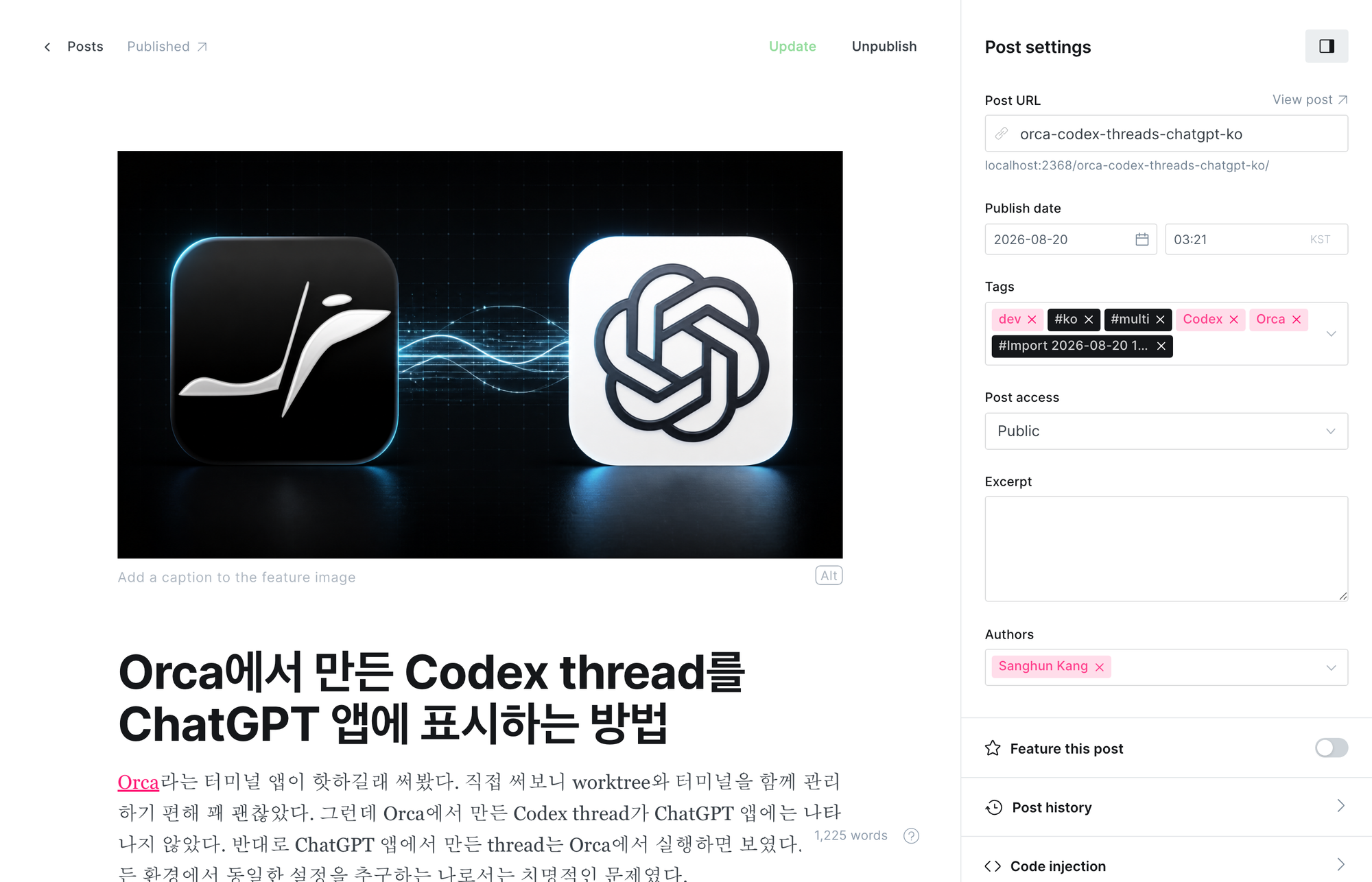
This is a screen showing a real published post imported into local Ghost. The slug ends with `orca-codex-threads-chatgpt-ko`, and the tags include both `#ko` and `#multi`.
[0.0.8 · Automated bilingual hreflang and tag detection](https://github.com/sanghunka/ghost-multilingual-theme/commit/5492342?ref=sanghunkang.com)
## Rules for multilingual posts
I use the following rules for automation.
- The English post slug ends with `-en`.
- The Korean post slug ends with `-ko`.
- Add the `#multi` internal tag to posts whose translations are all ready.
- Each post must have either the `#en` or `#ko` internal tag to indicate its own language.
For example, the two posts below are one translation pair.
```text
English slug: multilingual-ghost-cms-en
Korean slug: multilingual-ghost-cms-ko
```
The actual URLs are generated like this.
```text
https://sanghunkang.com/multilingual-ghost-cms-en/
https://sanghunkang.com/ko/multilingual-ghost-cms-ko/
```
## partials/hreflang-multi.hbs
I separated the code that generates multilingual URLs for posts and pages into a separate partial.
First, set the supported languages and the default language.
```javascript
var LANGS = ["en", "ko"];
var DEFAULT_LANG = "en";
```
Next, turn all of the post's tag names into a JavaScript array.
```handlebars
var tagNames = [
{{#foreach tags visibility="all"}}
"{{name}}"{{#unless @last}},{{/unless}}
{{/foreach}}
];
```
The reason for specifying `visibility="all"` is that `#multi`, `#en`, and `#ko` are all internal tags. Without this option, Ghost excludes internal tags from the loop result.
If there is no `#multi`, do nothing.
```javascript
if (tagNames.indexOf("#multi") === -1) return;
```
The current post's language is also found from the tag array.
```javascript
var lang = null;
LANGS.forEach(function(l) {
if (tagNames.indexOf("#" + l) !== -1) lang = l;
});
if (!lang) return;
```
If you remove the trailing `-en` or `-ko` from the slug, you get the stem shared by the translated posts.
```javascript
var suffixPattern = new RegExp("-(" + LANGS.join("|") + ")$");
var stem = slug.replace(suffixPattern, "");
```
Append each language suffix and URL prefix back onto this stem to build the URL for each language.
```javascript
function buildUrl(l) {
var prefix = (l === DEFAULT_LANG) ? "" : "/" + l;
return siteUrl + prefix + "/" + stem + "-" + l + "/";
}
```
Finally, add `hreflang` links to ``.
```javascript
var html = "";
LANGS.forEach(function(l) {
html += '';
});
html += '';
document.head.insertAdjacentHTML("beforeend", html);
```
## Calling the partial in post and page contexts
In the `` of `default.hbs`, call the partial when the current view is a post or a page.
```handlebars
{{#is "post"}}
{{#post}}
{{> "hreflang-multi"}}
{{/post}}
{{/is}}
{{#is "page"}}
{{#page}}
{{> "hreflang-multi"}}
{{/page}}
{{/is}}
```
It must be called inside the `{{#post}}` and `{{#page}}` contexts so the partial can use the current content's `{{slug}}` and `{{tags}}`.
## The problem that depended on tag order
The existing Tag page used the rule that the second tag was the language tag.
```handlebars
data-language="{{tags.[1].name}}"
```
With this approach, if the tag order changes, language filtering breaks.
```text
[Ghost, #ko, #multi] -> works
[#multi, Ghost, #ko] -> fails
```
In 0.0.8, all tags of each post are placed into `data-tags`.
```handlebars
```
JavaScript searches the entire array for the language tag.
```javascript
let cardLang = null;
LANGS.forEach(l => {
if (tagNames.indexOf('#' + l) !== -1) {
cardLang = l;
}
});
```
Now it does not matter which position `#en` or `#ko` is in.
I also did not use Ghost's `{{#has tag="..."}}` helper to detect internal tags. The display name of the internal tag is `#multi`, but its actual slug is `hash-multi`, so if you confuse the name and slug, the condition can fail silently. Passing all internal tag names into an array and comparing them explicitly in JavaScript was more predictable.
## Checking the result
Open Developer Tools on a `#multi` post and run the code below.
```javascript
[...document.querySelectorAll('link[rel="alternate"][hreflang]')]
.map(link => [link.hreflang, link.href]);
```
On both the English post and the Korean post, three links, `en`, `ko`, and `x-default`, should appear, and each URL should point to the correct translated post.
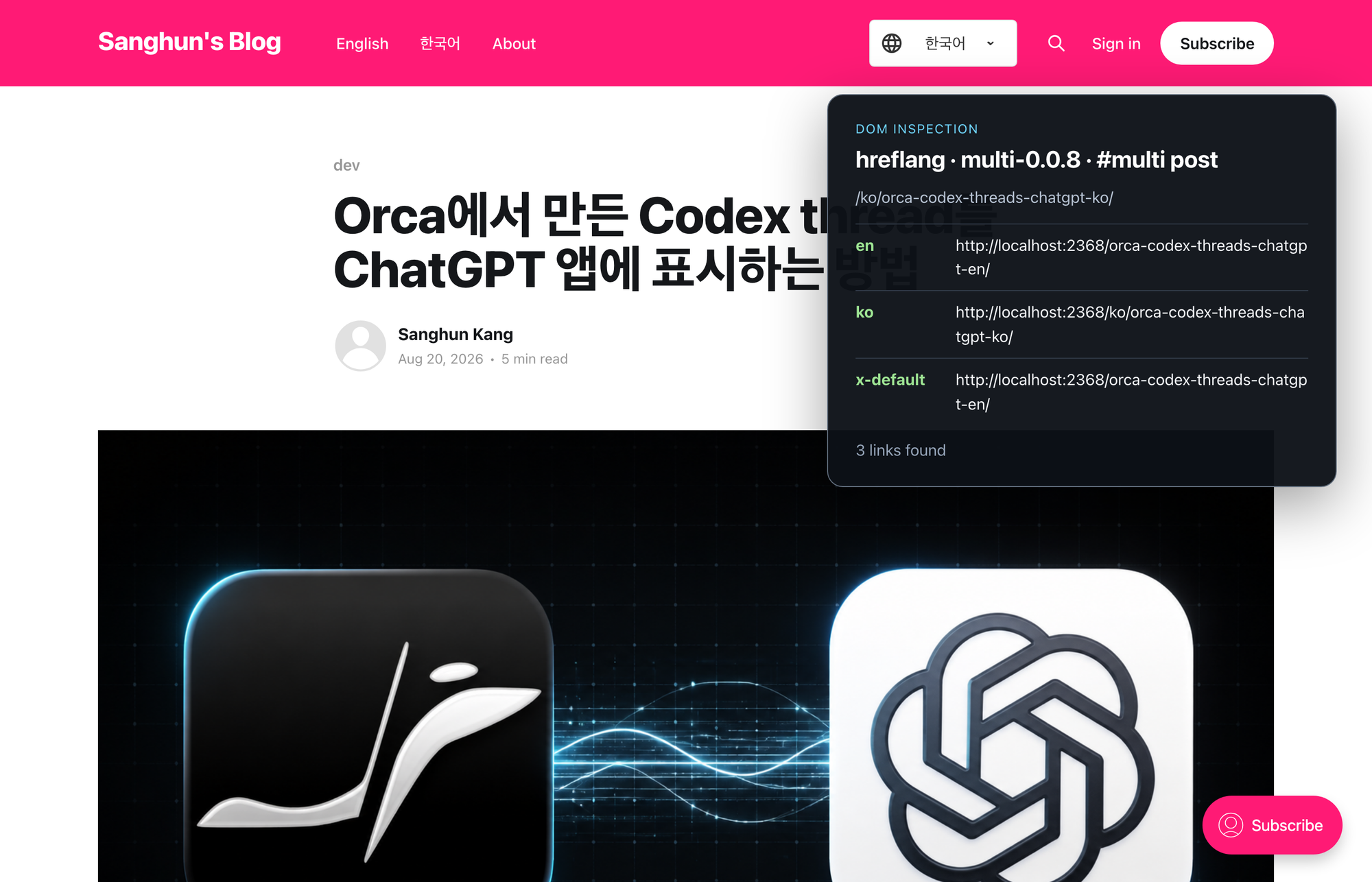
This is the result of inspecting the DOM on the Korean Orca post. `en` points to the English translated post, `ko` points to the current Korean post, and `x-default` points to the English translated post. The black panel is an overlay showing the actual DOM query result on the screen.
On the Tag page, even if you change the order of a post's tags, only posts in the selected language should still display correctly.
## Things to watch out for
`#multi` should be added only when all language versions actually exist. If there is only a Korean post but you add `#multi`, the theme will also generate an English URL according to the rule, and that URL will return a 404.
Also, the post's `hreflang` is added to `` by browser JavaScript. Google renders JavaScript, so it can process this approach, but some crawlers with weak JavaScript rendering may miss the links.
---
Starting from 0.0.8, if you set the language tag and `#multi` correctly on translated posts, `hreflang` is generated automatically.